


Intro to Daily Quests
Every day you receive 5 personal quests matched to your character's strength. Complete all five, claim each reward, and a Bonus Chest unlocks with jewels, W Coins and Goblin Points. The quests reset at midnight, so the chest can be earned again every single day.
This guide explains how the system works and how to use it. For the difficulty brackets and everything the Bonus Chest can contain, see Daily Quests: Tiers & Bonus Chest.
How It Works
When you enter the game world, the server checks whether you already have quests for today. If you do not, it assigns 5 quests drawn from your Tier, a difficulty bracket based on your resets. Quests are stored per character, so every character on your account gets its own set.
There are two kinds of quest:
| TYPE | HOW TO COMPLETE |
|---|---|
| Hunt | Kill the named monster the required number of times. Progress counts automatically. If your pet or summon lands the killing blow, the kill is credited to the player who dealt the most damage. |
| Collect | Pick up the named item the required number of times. Progress counts the moment the item enters your inventory. Keep the items, because they are taken from you when you claim the reward. |
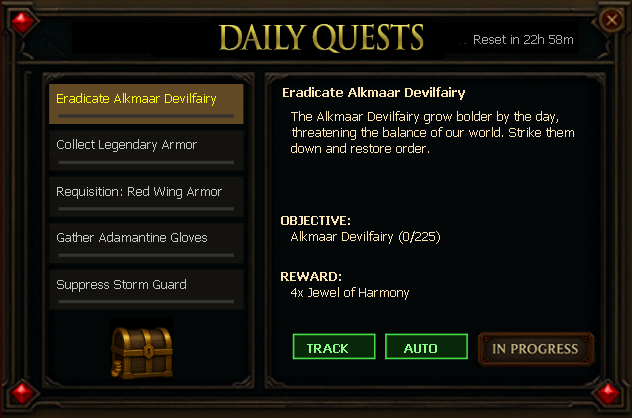
Opening the Window
Click the Daily Quests ! button at the top of your screen. The button text turns green whenever a reward or the bonus chest is waiting to be claimed, so you always know at a glance if something is ready.
The button hides itself while the inventory and expanded inventory (or character panel and inventory) are open at the same time, so it never blocks your view.

Inside the Window
| ELEMENT | WHAT IT DOES |
|---|---|
| Quest list | Your 5 quests. Click one to see its objective and reward on the right. |
| Progress / Claim! / Done | The button changes with the quest state. Claim! means the reward is ready. |
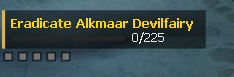
| TRACK | Pins the selected quest to the HUD tracker at the left of your screen. |
| AUTO | Automatically tracks a quest for you and switches to the next one as you finish them. |
| Reset timer | Shows Reset in Xh XXm, the time left before a fresh set of quests is handed out. |
| Bonus Chest | Locked until all 5 rewards are claimed. Once opened it disappears and shows Come back tomorrow! |
Claiming Your Rewards
Each quest is claimed on its own. Open the window, select a finished quest and press Claim!
- Item rewards are delivered to your Gremory Case, not to your inventory.
- WCoins and Gold Points are added to your account instantly.
- On a Collect quest the required items are removed from your inventory at this moment. If they are missing, the claim fails.
Important
The Bonus Chest requires all 5 rewards to be CLAIMED. Finishing the quests is not enough.
Tips
- Turn AUTO on and let the tracker follow your quests for you, with no need to reopen the window.
- Never sell or drop a collect item before claiming. The reward is only handed over when the items are still in your inventory.
- Claim all 5 rewards before midnight. Unclaimed quests are replaced by the next day's set.
- Each character has its own quests, so a second character means a second Bonus Chest every day.
- Empty your Gremory Case regularly, because every item reward lands there.
Reporting a Problem
If a quest looks wrong or refuses to count, hold the right mouse button on the quest row for 3 seconds. The raw quest data is shown and a report is sent straight to the team, so the quest can be checked and fixed.
Five quests. One chest. Every single day.